


Saving money shouldn’t require a spreadsheet and a personality makeover. The best money-saving apps do the heavy lifting for you: They nudge a few dollars aside every couple of days, round up your purchases, or automate the boring stuff so you actually stick with it.
Research consistently shows automation boosts follow-through. When saving happens in the background, you don’t need to rely on willpower. And as a result, you save more with less effort.
Below, we’ve rounded up the most useful apps that help save money for different situations, whether you want hands-off savings, goal tracking, round-ups, or a cash buffer before payday.
| App | Best for | Auto savings | Round-ups | High yield/APY |
|---|---|---|---|---|
 Visit Site | Quick savings goals | ✅ | ➖ | ➖ |
 Visit Site | Automated savings with AI | ✅ | ➖ | ➖ |
 Visit Site | Savings and earning options | ✅ | ✅ | 4.00% |
 Visit Site | All-in-one automated savings | ✅ | ✅ | Up to 3.75% |
 Visit Site | Flexible savings pods | ✅ | ✅ | Up to 4.00% |
 Visit Site | All-in-one money management | ✅ | ➖ | Varies |
 Visit Site | Round-ups that invest | ✅ | ✅ | Up to 4.05% |
 Visit Site | Creative savings rules | ✅ | ✅ | ➖ |
 Visit Site | Personalized auto-savings | ✅ | ➖ | ➖ |
 Visit Site | Subscription control and savings | ✅ | ➖ | ➖ |
Table of Contents
What are money-saving apps, and how do they work?
Money-saving apps help you set money aside automatically (or painlessly) so your savings stack up over time. Most apps do one or more of the following:
- Insights: Nudges, alerts, and spending trends to keep you consistent.
- Automated transfers: Move small amounts to savings on a schedule you set (daily/weekly/payday).
- Round-ups: Round each purchase to the nearest dollar and save the change.
- Savings goals and envelopes: Create labeled buckets for goals like emergency funds and travel (while also helping you track progress).
- Autosave rules: This could be something like: save when X happens (paycheck hits, you get a refund, you spend at a certain store).
- High-yield savings (APY): You can use some apps to save money and earn interest on your balance inside the app or linked account.
- Cash buffer tools: Some saving apps provide small, no-interest cash advances to bridge the gap before payday (with fees or optional tips).
Here’s more about each of our picks for the best money-saving apps.
1. EarnIn
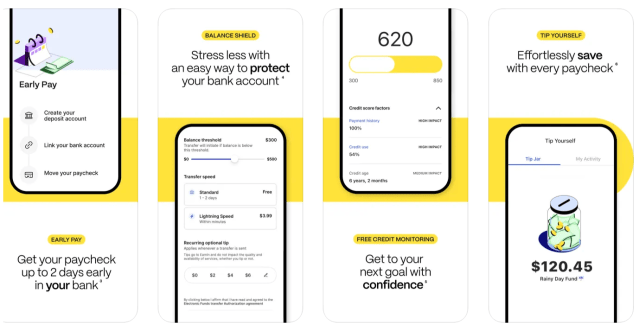
Why we like EarnIn’s Tip Yourself
Cost: Free
EarnIn’s “Tip Yourself” feature makes saving painless. You can set up to five “Tip Jars,” add money manually or with AutoSave on payday, and pull it back whenever you need it.
There are no fees, no minimums, and your cash sits in an FDIC-insured account. (And quick bonus: EarnIn also has one of the best cash advance apps if you need money before payday.)
- Up to 5 Tip Jars
- Save up to $100 per day
- AutoSave on payday or custom schedule
- Free withdrawals back to your bank
- No fees
- Free, instant $100 cash advance for qualifying first-time users
- No interest earned on savings
Our experience using EarnIn
We like how easy it is to create multiple jars and watch the progress build visually in the app. Transfers back to a bank account are generally fast, and the AutoSave rules are simple to toggle on or off. It feels like a digital upgrade to cash envelopes, except you don’t earn any interest on your savings.
2. Tilt
Why we like Tilt’s AutoSave feature
Cost: $8/month
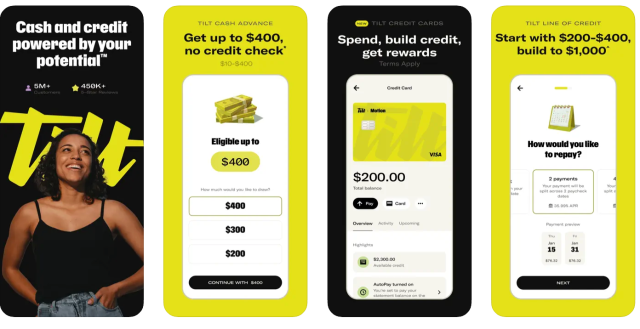
Tilt (formerly Empower) is a great app that helps you save money because it uses AI to analyze your income and expenses, then automatically moves money into savings when your budget allows.
You can set goals, choose a weekly plan or paycheck-based transfers, and the app adjusts in real time to avoid overdrafts. Savings live in an FDIC-insured account with nbkc bank, and you can transfer money out anytime.
- AI-driven AutoSave rules
- Weekly or paycheck transfer options
- Adjustable savings goals
- FDIC-insured account via nbkc bank
- Pause or edit AutoSave anytime
- No interest earned on savings
- Monthly fee
Our experience using Tilt
We like that Tilt’s AutoSave doesn’t feel like guesswork. It automatically times transfers around cash flow (aka when you get paid) and is easy to pause when you need it. The app feels smarter than a fixed savings rule, and being able to move money out instantly can give peace of mind if you find yourself in a crunch.
What our expert thinks
I think Tilt is an excellent savings app that stands out for its ease of use and thoughtful features. It streamlines the saving process through automation, fosters accountability by allowing users to create savings communities with friends or family, and incorporates motivating, engaging elements that make saving feel less like a chore.
Feedback from others has also highlighted how enjoyable and encouraging the app is compared to more rigid financial tools.

3. Dave
Why we like Dave’s Goals account
Cost: Up to $5/month
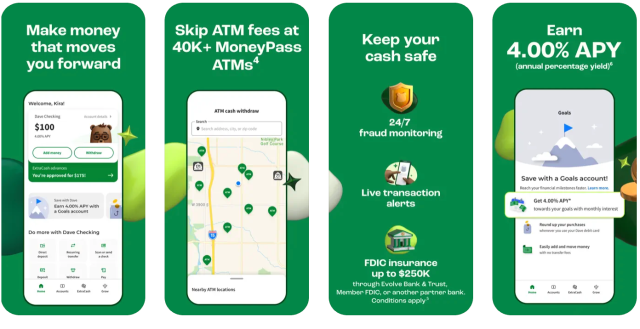
Dave is one of the best apps to save money and earn interest because its Goals account pays 4.00% APY, with no minimums or hidden fees. You can set personalized goals, make automatic transfers, and even round up debit card purchases to save spare change.
On top of that, the Side Hustle feature connects you to surveys and more than 1,000 flexible gigs and side hustles so you can grow your income right from the app.
- 4.00% APY on Goals Account
- Automatic transfers and round-ups
- Personalized savings goals
- No minimum deposits or hidden fees
- Side Hustle board with gigs and surveys
Our experience using Dave
We love Dave’s Goals Account for saving money and earning interest. You can literally name the account what you’re saving for and track milestones. The 4% APY is competitive, and Round Ups make saving effortless in the background. Side Hustle is a bonus: It’s rare to see a savings app that also helps you earn more.
4. Chime
Why we like Chime Easy Savings
Cost: Free
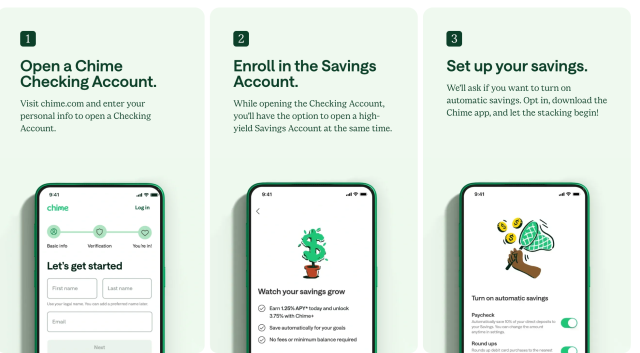
Chime is one of the best free money-saving apps out there. For instance, you can round up every debit card purchase to the nearest dollar, automatically move part of each paycheck into savings, and set up multiple Savings Goals with visual progress bars to stay motivated.
The account is FDIC-insured and pays up to 3.75% APY for members with qualifying direct deposit.
- Round-ups on every debit card purchase
- Auto-transfer a percentage of each paycheck
- Create multiple, customizable savings goals
- Up to 3.75% APY with Chime+ (free with direct deposit)
- FDIC-insured savings account
Our experience using Chime
Chime is the best if you’re looking for a savings app that also features a high-yield, low-fee bank and savings account packed with tons of automated tools.
With the savings account specifically, you can name goals, add emojis, and watch progress bars fill in real time. Round-ups and paycheck transfers make saving automatic, and the celebratory messages when hitting a goal can be surprisingly motivating. (It’s like having a little savings cheerleader in your pocket.)
5. Current
Why we like Current Save
Cost: Free
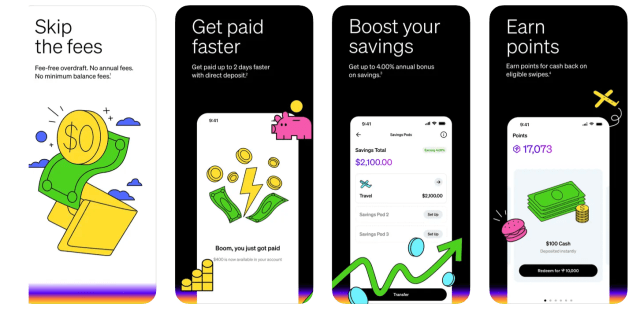
If you like the idea of creating little pods for all your savings goals, Current is for you. This money saving app helps you organize savings into up to three “Pods” for different goals, like travel or emergencies. You can fund pods directly, link an outside bank, or turn on Round-Ups to stash spare change from every debit card purchase.
With qualifying direct deposits, pods can earn up to 4.00% annually (0.25% if not). Money is FDIC-insured through partner banks, and you can move funds in and out anytime with no penalties.
- Create up to 3 savings pods
- Round-ups on debit purchases
- Up to 4.00% annual bonus with direct deposit
- FDIC-insured funds via partner banks
- No minimum balance required
Our experience using Current
We like how easy it is to label and track multiple savings goals inside Current. Round-ups make saving almost invisible, and the ability to boost earnings to 4% APY with direct deposit is an excellent benefit. It feels like a modern, flexible take on envelope budgeting. If you’re looking for a free round-up savings app, Current could be for you.
What our expert thinks
I recommend Current for individuals who prefer organizing their savings into customizable buckets, or Pods. The fact that the app is free adds further value.
6. Albert

Cost: $14.99 – $39.99/month
Why we like the Albert app
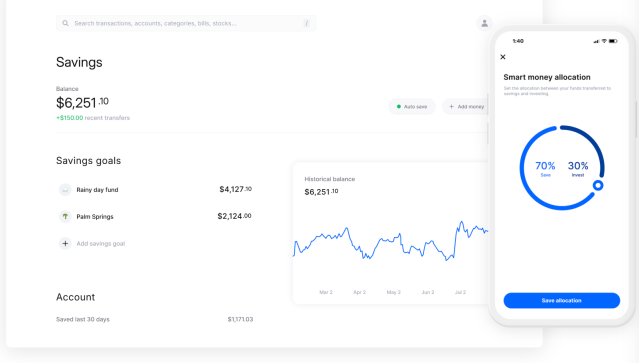
Albert is more than a savings app; it’s a full financial hub. For example, its Smart Money feature analyzes your income and expenses to automatically set aside small amounts you can afford.
You can create multiple goals, prioritize them, or pause them at any time. Beyond savings, Albert includes budgeting, bill tracking, investing, and identity protection, so it’s one of the most feature-rich options out there if you want an all-in-one money-saving app.
- Smart Money auto-saves small amounts
- Multiple savings goals with priorities
- Budgeting and bill tracking tools
- Optional investing portfolios
- FDIC-insured savings accounts
- Steep monthly fees
Our experience using Albert
We like how effortless Albert makes saving. Plus, you get a huge dashboard that breaks dowon your budget, spending, and all the analytics you need to make smarter money decisions.
We also love the Smart Money deposits for stashing away money, and that you can pause or reprioritize goals as needed. It’s ideal if you want an app that saves and helps with the bigger financial picture.
7. Acorns
Why we like the Acorns app
Cost: $3 – $12/month
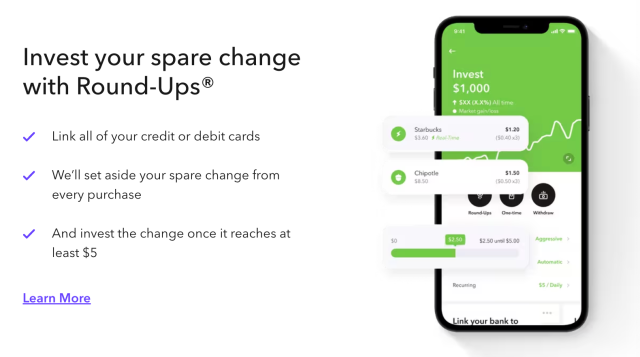
Acorns is a great automatic savings app if you’re interested in investing specifically. Every purchase you make with its Mighty Oak Debit Card (or linked accounts) can trigger a Round-Up that turns spare change into automatic investments.
The platform has expert-built, diversified portfolios managed by top firms, and you can add recurring deposits or open retirement and kids’ accounts. Acorns also offers banking via its debit card, with up to 4.05% APY on Emergency Savings, so it’s a true all-in-one app for saving and investing.
- Round-Ups invest spare change automatically
- Expert-built ETF portfolios
- Retirement and kids’ investing accounts
- Up to 4.05% APY on savings
- Banking and debit card with no overdraft fees
- Monthly fee
Our experience using Acorns
Plenty of savings apps offer round-ups these days. But Acorns is an OG option that sweeps your money into investments, not just a savings account. The Round-Ups happen quietly in the background, and the app’s visuals make it easy to see how small deposits grow over time. It’s a solid pick if you’ve struggled to get started with investing and want to try an automatic approach.
8. Qapital
Why we like the Qapital app
Cost: $3 – $12/month (30-day free trial)
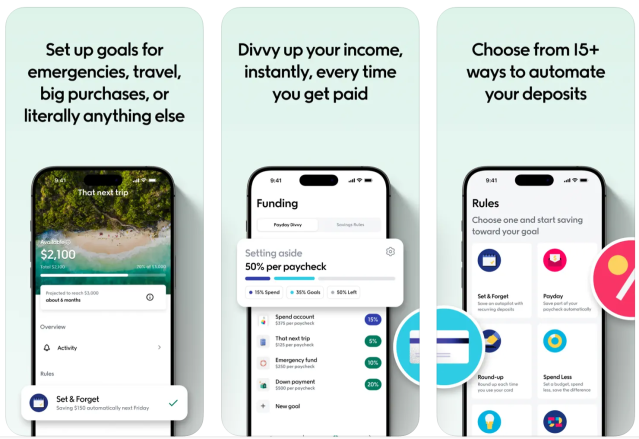
Qapital is a money-saving app that makes stashing away cash for Future You fun with 15+ customizable rules. You can round up purchases, set “guilty pleasure” triggers (e.g., save $5 every time you buy coffee), or even tie savings to workouts via Apple Health.
Freelancers can use rules to stash a percentage of income for taxes, and the app’s Payday Divvy tool automatically splits deposits into savings, investments, and spending.
- 15+ savings rules, from round-ups to fitness triggers
- Payday Divvy for automatic paycheck splits
- Visual savings goals with progress tracking
- Team savings with friends or partners
- FDIC-insured partner banks
- Monthly fee
Our experience using Qapital
Qapital just might be the best app for saving money goals. Linking savings to everyday habits, like coffee runs or steps walked, makes it feel motivating instead of restrictive. The Payday Divvy is especially helpful for budgeting without overthinking.
9. Oportun
Why we like Oportun Set & Save
Cost: $5/month (30-day free trial)
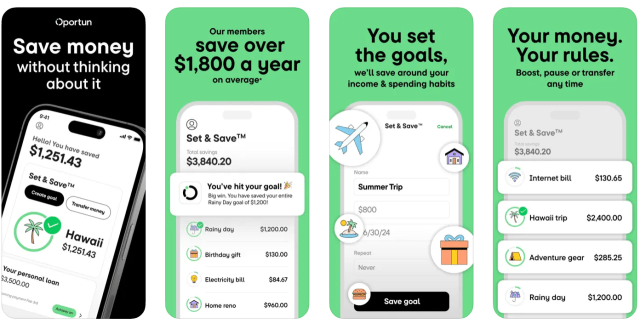
Oportun is another one of the best money-saving apps because of its Set & Save feature. With this feature, the app learns your income and spending patterns, then moves small amounts of money automatically when you can afford it. You can create unlimited goals, like travel, gifts, or loan payments, and set guardrails, such as a minimum balance or daily savings cap.
Your money is FDIC-insured with this savings app, and Oportun says it helps its members save $1,800 on average per year and has helped create more than 15 million savings goals.
- AI-driven auto-savings from linked bank
- Unlimited savings goals
- Balance protection and daily savings caps
- FDIC-insured funds
- 30-day free trial
- Monthly fee
Our experience using Oportun
It’s pretty cool how Oportun works quietly in the background as you go about your life. It shifts money in small, painless amounts and makes it easy to keep multiple goals moving at once. The surprise factor, realizing you’ve saved without noticing, is motivating, and the $5 per month fee could be worth it if you struggle to save consistently.
10. Rocket Money
Why we like the Rocket Money app
Cost: Free; $6 – $12/month for premium
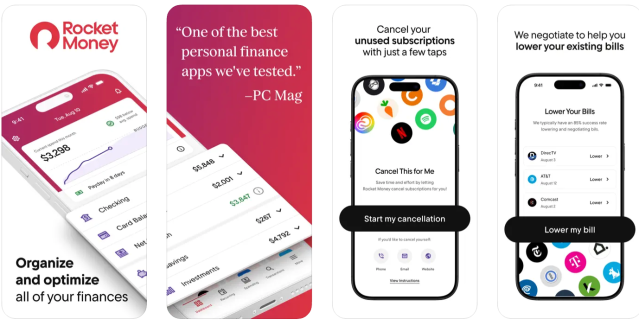
Rocket Money is another top automatic savings app because it has a feature most other apps don’t: It helps you manage subscriptions. Plus, its Financial Goals feature automatically moves money to savings when you can afford it to help you reach goals without overdrafting.
The subscription service works like this: The app scans your accounts for recurring subscriptions, tracks them, and can even cancel unwanted services for you, freeing up more cash to save. Premium members also get an automated savings plan to track goals, bill negotiation, and concierge support.
- Automated savings with overdraft protection
- Subscription tracking and cancellation service
- FDIC-insured savings accounts
- Bill negotiation with Premium plan
- Net worth and credit score tracking
Our experience using Rocket Money
We love that Rocket Money tackles both sides of the equation: cutting waste and building savings. The subscription finder can be eye-opening, and the autopilot savings makes it easy to stash a few dollars for later without trying. It’s ideal if you want one app to tidy up your financial life.
About our contributors
-
 Written by Cassidy Horton, MBA
Cassidy Horton is a finance writer passionate about helping people find financial freedom. With an MBA and a bachelor's in public relations, her work has been published more than 1,000 times online.
-
 Edited by Kristen Barrett, MAT
Kristen Barrett is a managing editor at LendEDU. She lives in Cincinnati, Ohio, with her wife and their pack of senior rescue dogs. She has edited and written personal finance content since 2015.
-
 Reviewed by Erin Kinkade, CFP®
Erin Kinkade, CFP®, ChFC®, works as a financial planner at AAFMAA Wealth Management & Trust. Erin prepares comprehensive financial plans for military veterans and their families.