


When you need fast cash, the last thing you want to deal with is compatibility issues between your financial apps. But that’s exactly the problem many Cash App users face when trying to access cash advance services.
Many cash borrowing apps rely on Plaid to verify your bank account and link your financial information. The problem is that Plaid doesn’t support Cash App.
Need cash, like, right now? EarnIn lets eligible users access up to $300 from their earned wages with no interest or mandatory fees.¹ First-time users may be eligible for expedited funding at no cost.²
EarnIn does not charge interest on Cash Outs or mandatory fees for standard transfers, which usually take 1-2 business days. For faster transfers, you can choose the Lightning Speed option and pay a fee to receive funds within 30 minutes. Lightning Speed may not be available at all times and/or to all customers. Restrictions and terms apply; see the Lightning Speed Fee Table and Cash Out User Agreement for details and eligibility requirements. Tips are optional and do not affect the quality or availability of services.
Lightning Speed is an optional service that allows you to expedite the transfer of funds for a fee. Depending on the product, the fee may be charged by EarnIn or its banking partner. Lightning Speed may not be available in all states and/or to all customers. Restrictions and terms apply. See the Lightning Speed Fee Table for details.
Some apps have found ways to work with Cash App, either through direct integration or alternative connection methods. The key is knowing which ones are compatible and understanding how to link them properly. Here’s what you need to know.




Table of Contents
EarnIn Cash Out
How it works
| Borrowing amounts | Up to $300 per day; up to $1,000 per pay period |
| Fees | $3.99 – $5.99 for Lightning Speed |
| Eligibility | Consistent pay schedule and at least $320 in earnings per paycheck |
EarnIn Cash Out separates itself from the competition by offering daily advances of your paycheck. You’ll start out with a pay period max of $50 to $250, but you can increase that to as much as $1,000 over time. Your advance is repaid when you receive your paycheck.
There’s no fee for regular transfers, which take one to two business days. However, if you want the money faster, you can pay a Lightning fee of $3.99 to $5.99 (depending on your advance amount) to receive it within minutes.
Possible Finance
How it works
| Borrowing amounts | $10 – $300 |
| Fees | $15 per month membership for delivery within minutes; 10% disbursement fee for express delivery for non-members |
| Eligibility | Limited state availability; Must have an eligible bank account and a regular source of income |
With the Possible Advance, you can get up to $300, though non-members can only qualify for up to $150. Possible Membership is available in Colorado, Massachusetts, Minnesota, New Jersey, North Dakota, South Dakota, West Virginia, and Wisconsin.
Single Payment Advance (the option that doesn’t require membership) is in beta testing. It’s only available in a handful of states: Georgia, New Jersey, New Mexico, North Dakota, South Dakota, and Wisconsin.
As a member, you can pay back what you owe over four installments; otherwise, your repayment date will be your next payday.
In addition to no fees on delivery in minutes (regular funding takes up to three business days), Possible members can also get access to several other products and features.
MoneyLion Instacash
How it works
| Borrowing amounts | $25 – $500 for non-members; up to $1,000 with a RoarMoney account and qualifying direct deposits |
| Fees | $0.49 – $8.99 for Turbo delivery |
| Eligibility | Must have a bank account with regular deposits and be in good standing with MoneyLion |
With MoneyLion Instacash, you can get up to $1,000, though the highest limits are only accessible to customers with a RoarMoney banking account. You won’t pay any fees to request an advance, and it’ll take one to two business days for RoarMoney users and two to five business days to request transfers to an external account.
If you want the funds within minutes, you can pay a Turbo delivery fee, which ranges from $0.49 to $8.99, depending on the advance amount and the type of account you’re transferring to. You’ll receive a due date before completing your request.
Albert
How it works
| Borrowing amounts | $25 – $1,000 |
| Fees | No fee for Instant Advances to Albert Cash; $5.99 – $19.99 fee to transfer to external accounts |
| Eligibility | Must have an active bank account with a long transaction history linked to Albert |
Albert offers a variety of financial products and services, and while a membership can run you anywhere from $14.99 to $39.99 per month, you can get access to Albert Instant Advances with no monthly fee. Any amount you borrow is due within six days.
It’s relatively easy to qualify for an Instant Advance. However, you’ll need to open an Albert Cash account to avoid transfer fees and get access to higher limits.
Cash App Borrow
How it works
| Borrowing amounts | $20 – $400 |
| Fees | 5% flat fee |
| Eligibility | Currently in testing phase; eligibility is limited |
Cash App has its own advance feature called Cash App Borrow. However, details about the program are sparse, and not all app users are eligible. It’s still in the testing phase, so it’s unclear how Cash App determines eligibility.
If you have access, you’ll see the option on your banking tab:
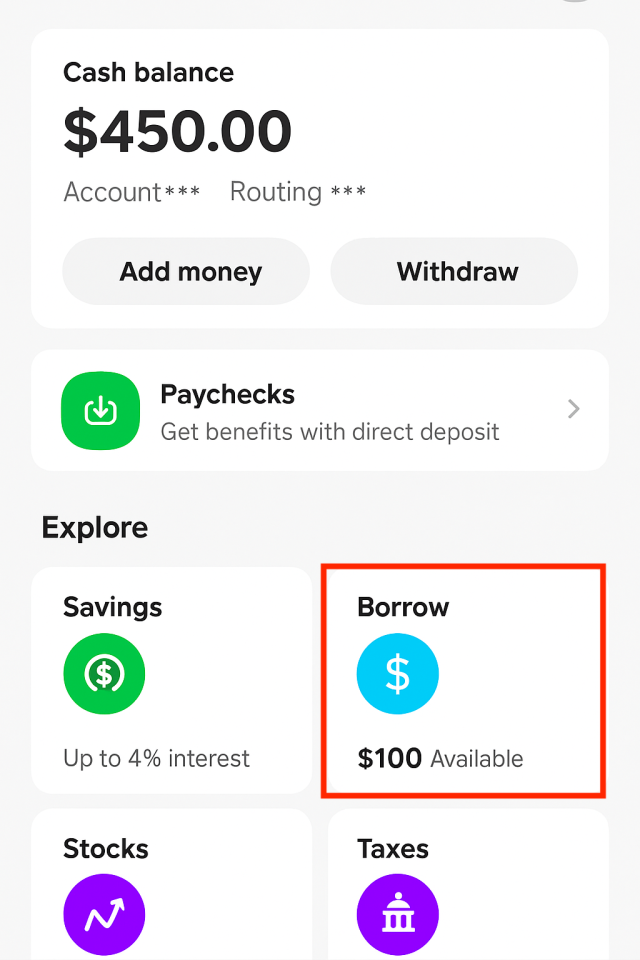
If you take out an advance, you’ll have four weeks to repay what you owe. If you are eligible, Cash App Borrow may be the easiest way to access funds immediately. But with a mandatory 5% fee, it’s not the cheapest.
Because terms and fees for these apps can change, I recommend paying attention to the details and confirming that you understand exactly what you’ll pay before proceeding with a paycheck advance.

Apps that don’t work with Plaid
While some paycheck advance apps have found workarounds for Cash App compatibility, several popular options won’t work with your account. Here are the apps you should avoid if Cash App is your primary banking solution:
- Dave: Explicitly states that Cash App is not supported as a connected bank account.
- Brigit: Relies exclusively on Plaid for account verification, which doesn’t connect to Cash App.
- Klover: Explicitly states that Cash App cannot be linked to the platform.
- Chime SpotMe: Only works with Chime checking accounts and doesn’t support external accounts like Cash App.
- Current: Uses Plaid exclusively for bank connections, making Cash App incompatible.
How to link a cash advance app to Cash App
Successfully connecting a cash advance app to Cash App depends on which linking method the app supports. Here are the three main approaches you can use:
- Direct linking (if available): Some apps allow you to connect Cash App directly through their interface, bypassing Plaid entirely. This is the easiest method when available. It creates a seamless connection between the two platforms.
- Debit card: Some cash advance apps let you link your Cash App debit card as the funding destination. Simply enter your Cash App card details (card number, expiration date, and CVV) in the app’s payment settings.
- Manual linking: Cash App provides you with an account and routing number that functions like a traditional bank account. You can enter these numbers manually in cash advance apps that offer this method, even if they primarily use Plaid.
Keep in mind there’s also an indirect workaround: You can have the cash advance deposited into a traditional bank account that’s linked to your Cash App and then manually transfer the funds to Cash App. However, this adds an extra step and delays access to your money.
How to choose the best cash advance app for Cash App
Not all cash advance apps are created equal, especially when it comes to Cash App compatibility. Here’s what to evaluate when choosing the right app for your needs:
- Compatibility and link method: Verify the app works with Cash App and determine whether it uses direct linking, debit card linking, or manual account linking.
- Advance amount needed: Check the maximum amount offered; this varies significantly between apps.
- Fee structure: Compare fees, interest rates, and membership costs to understand the true cost of borrowing.
- Delivery speed: Consider how soon you’ll receive funds. Some apps offer express transfers (often for a fee), and standard transfers may take days.
- Additional features: Look for perks like credit building, budgeting tools, or flexible repayment options that add value beyond the advance.
While cash advance apps can help in emergencies, relying on them regularly can create a cycle of debt. We recommend avoiding regular use whenever possible.
I’ve noticed a growing reliance on the quick fix of cash advance apps instead of building a proper emergency fund. While they can provide short-term relief, this habit can create a false sense of security, lead to unnecessary out-of-pocket costs through fees, and ultimately undermine sound financial decision-making.
There are times when a small cash advance may be necessary, but these tools should be used sparingly and not as a substitute for long-term financial planning.
Common issues and how to fix them
Cash App users frequently run into connectivity problems when trying to use cash advance apps. Here are the most common issues and their solutions.
My app won’t link to Cash App
Try linking via your Cash App debit card number or by entering your Cash App account and routing numbers manually. If that’s not an option, it may not be compatible.
Plaid can’t find Cash App
Plaid doesn’t support Cash App, but you may be able to bypass it by using your debit card number or manually entering your account and routing numbers.
My transfer to Cash App failed
Double-check that you entered your account details correctly. If they’re accurate, consider reaching out to the cash advance app’s or Cash App’s support team.
I don’t have a traditional bank account
Most cash advance apps require either a bank account or debit card, but you can use your Cash App debit card if the app supports debit card linking.
The advance amount is too low
New users typically receive lower credit limits that increase over time as you build a history with the app. Some apps may have other requirements, such as a membership.
Recap of paycheck advance apps that work with Cash App
Article sources
At LendEDU, our writers and editors rely on primary sources, such as government data and websites, industry reports and whitepapers, and interviews with experts and company representatives. We also reference reputable company websites and research from established publishers. This approach allows us to produce content that is accurate, unbiased, and supported by reliable evidence. Read more about our editorial standards.
- EarnIn, EarnIn Cash Out
- Albert, Albert Instant
- MoneyLion, MoneyLion Instacash
- Possible Finance, Possible Advance
About our contributors
-
 Written by Ben Luthi
Ben Luthi is a Salt Lake City-based freelance writer who specializes in a variety of personal finance and travel topics. He worked in banking, auto financing, insurance, and financial planning before becoming a full-time writer.
-
 Edited by Kristen Barrett, MAT
Kristen Barrett is a managing editor at LendEDU. She lives in Cincinnati, Ohio, with her wife and their pack of senior rescue dogs. She has edited and written personal finance content since 2015.
-
 Reviewed by Erin Kinkade, CFP®
Erin Kinkade, CFP®, ChFC®, works as a financial planner at AAFMAA Wealth Management & Trust. Erin prepares comprehensive financial plans for military veterans and their families.